RoadReady
- 3.3
- Rating
- 500.00K
- Installs
- Free
- Price

 Analysis by App-foxy
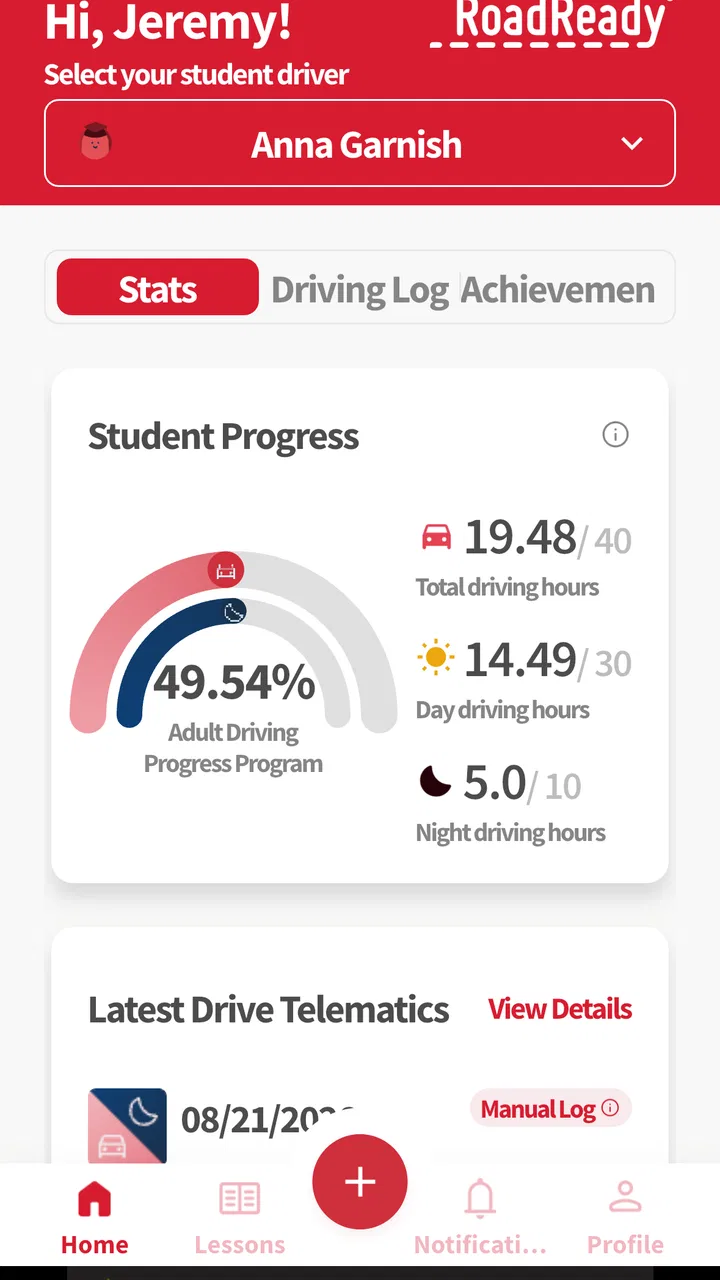
Learning to drive is full of small moments that are easy to forget: a short trip to the supermarket, a difficult left turn, a rainy evening, or the first time a learner handles a busy junction. RoadReady is designed to turn those practice drives into a record that a learner and supervising adult can look back on. I found its value less in teaching driving theory and more in creating a habit of documenting real time behind the wheel during the learner’s permit stage.
That distinction matters. This is an education app, but it is not a replacement for an instructor, a handbook, or calm guidance from an experienced adult. Its useful role is practical: it helps give structure to practice. If your family tends to say, “We need more driving time,” without remembering exactly what has already been covered, a dedicated log can make those conversations more concrete.
The app is free, aimed at Everyone, and comes from Safe Roads Alliance, Inc. It has passed 500K installs and holds an average rating of 3.3 from around 3.7K ratings, with roughly 2.4K written reviews. Those figures suggest a product that many families have tried, though the mixed rating also fits my experience: the central idea is useful, while the quality of the experience depends heavily on how consistently you use it and how smoothly it behaves on your particular phone.
You May Also Like

 Blood Strike: 2.5 Anniversary
Blood Strike’s Loadouts Turn Every Drop Into a Tactical Gamble
A close look at Blood Strike’s custom loadouts: how fast access to signature weapons reshapes its battle royale rhythm, rewards preparation, and narrows the gap between fights.

 Pandora - Music & Podcasts
Pandora’s Music Is Easy to Start, but Harder to Recover
Pandora’s strength is its low-effort path from a seed to a station. Its weak spot is how much confidence it asks you to place in connection, setup, and quiet recovery.

 8 Ball Pool
 Is Built on Rivalries, Rematches, and Routine
A close look at the rivalries, rematches, shared routines, and unanswered safety questions that turn a quick pool match into a persistent mobile community.

 Samsung Music
’s Quiet Strength Is Playing What You Already Own
Its reach comes less from spectacle than from dependable access to a personal library. That simplicity is both the app’s strongest retention engine and its ceiling.

 AccuWeather: Weather Radar
AccuWeather Review: A Quick, Clear Forecast for Everyday Decisions
For everyday plans, the best forecast is the one you can understand quickly. AccuWeather makes rain timing, radar, and local conditions easy to act on, with a few trade-offs.

 Hill Climb Racing
Why Hill Climb Racing Still Turns Crashes Into One More Run
A tiny car, a bumpy hill and one more upgrade: Hill Climb Racing keeps resurfacing because its simple chaos makes every near-miss feel personal.
More From Our News Desk



What the driving log is really useful for
The obvious use is recording practice during the learner’s permit phase. The less obvious benefit is that it changes practice from a vague family task into a sequence of small goals. Instead of treating every outing as another drive, I would use the record to notice whether the learner is getting exposure to different conditions and responsibilities.
For example, a learner might begin with quiet residential streets, then gradually practice parking, lane changes, unfamiliar routes, and busier traffic. RoadReady does not make those skills appear automatically, but a consistent log can reveal when practice has become repetitive. A teenager may feel confident after driving the same route several times, while the record shows that they have not yet dealt with a new neighborhood or a more demanding time of day.
This is one of the strongest reasons to use a purpose-built log instead of a notebook. A paper record can work, but it is easy to leave in the car, lose at home, or fill in days later from memory. A phone-based record is closer to the activity itself. The trade-off is that a phone introduces its own distractions and technical points of failure, so the person driving should never be the one interacting with it while the vehicle is moving.
I would treat the app as a prompt for a short review after the car is parked. The supervising adult can help enter the information, then discuss what went well and what deserves another attempt. That workflow is safer and more useful than trying to operate the phone at traffic lights or during a quick stop. It also encourages a better conversation than simply asking whether the drive was “good.”
A realistic family routine
Imagine a learner who drives to a sports practice twice a week with a parent. The route is familiar, so the teenager starts to assume that progress is happening automatically. After parking, the parent records the session and adds a brief mental note about the learner’s merging, speed control, or awareness near pedestrians. After several outings, they can see that the route provides useful repetition but not much variety.
The next weekend, they choose a different destination and deliberately include a parking area, a less familiar road, and a period with heavier traffic. The app does not plan that lesson for them; the family still has to make sensible decisions. What it does provide is a reason to pause, review the pattern, and avoid confusing familiarity with readiness.
That is a concrete advantage over relying on memory. It also shows the main limitation: the quality of the result depends on the honesty and detail of the person keeping the log. A rushed entry can become a meaningless checkbox, while a thoughtful entry can support a genuinely useful learning plan.
Where connectivity enters the experience
Because RoadReady is used on a phone, connectivity can shape the experience even when the driving lesson itself takes place away from a strong signal. I would not build a routine around assumptions about offline behavior. Instead, I would open the app before leaving, make sure the intended information is available, and complete any record only after stopping safely.
This is especially important on rural roads, underground parking levels, large campuses, or areas where mobile service changes from one stretch to the next. A weak connection can turn a simple logging task into an interruption, and that interruption is badly timed if the supervising adult is also trying to focus on the learner. The safest approach is to make driving the only priority and handle the app before departure or once parked.
Connectivity also affects expectations. RoadReady is not most useful as a live companion during a drive. Its role is better understood as a record-keeping tool surrounding the drive. That makes it less demanding than a navigation app, but it also means you should not expect it to guide every turn, coach every maneuver, or replace preparation before setting out.
Using it in different mobile contexts
Phone use feels different depending on who is holding the device. If the learner is alone in the car, the app should stay out of reach until the vehicle is safely parked. If a parent or instructor is present, that person can handle the record, but even then the safest moment is before moving or after arriving. A driving log is never worth dividing attention during a maneuver.
Small screens can also make a difference. On a compact phone, entering details immediately may feel slower than expected, particularly if the session was long or involved several types of practice. I prefer a simple routine: decide in advance who will log the drive, keep the phone accessible to that passenger, and make the entry part of the arrival process rather than an afterthought.
For families sharing a vehicle, consistency becomes important. One person may record every session carefully while another enters only the bare minimum. That can make the history harder to interpret. Agreeing on a simple household standard—such as recording the route context and one skill to revisit—can make the log more meaningful without turning it into paperwork.
There is also a privacy-minded reason to avoid unnecessary detail. A driving record can become more revealing when it includes exact routines, regular destinations, or identifiable notes. I would keep entries focused on practice rather than turning the app into a diary of a teenager’s movements. The goal is to support learning, not to collect more personal information than the family actually needs.
What to do when something goes wrong
Any app used around real-world routines needs a recovery plan. If the record does not save as expected, the drive itself should still be considered complete; do not circle back or use the phone while moving. Once parked, try the entry again, check whether the app responds normally, and keep a temporary note elsewhere if the session is important to your family’s tracking process.
I would also avoid waiting until the end of a long week to reconstruct several drives. Memory is unreliable, especially when multiple trips follow the same route. A quick note made safely after each session is more dependable than trying to recreate everything later. This is a workflow improvement rather than a special feature, but it makes a major difference to the usefulness of any driving log.
When connectivity is inconsistent, the best recovery habit is patience rather than repeated tapping. Finish the safety-critical part of the outing first, then reopen the app when the phone has a stable connection and the supervising adult has time to check the result. Repeatedly submitting the same entry can create confusion, while a calm review helps you notice whether the record actually appeared.
The app’s current version is 3.4.13, and it requires at least OS 7.1. That broad minimum makes it approachable for people using older compatible phones, but older hardware can still affect responsiveness, screen readability, or how comfortable the entry process feels. Before relying on it for an important practice record, I would test the basic workflow on the actual phone that will be used in the car.
Making the habit less wasteful of data and attention
A driving log should not require constant phone interaction. To keep the experience data-conscious and distraction-conscious, I would avoid opening it repeatedly during the journey. Prepare before leaving, record after parking, and use a short, consistent entry rather than trying to document every moment of the drive.
This approach also reduces battery and attention concerns without pretending that the app is an offline tool. The important point is not to assume that a weak signal will be harmless. If the family drives in places with unreliable service, test the intended routine in advance and keep a simple backup note for the rare session that cannot be entered immediately.
Another useful habit is reviewing the log periodically rather than editing it constantly. Once a week, the learner and supervisor can look for gaps: too much practice on familiar roads, too little parking, or no exposure to conditions that the learner finds uncomfortable. That review turns stored entries into decisions. Without it, the app risks becoming a digital version of a form that gets completed and forgotten.
I also think the app works best when the family agrees on what “enough detail” means. Overly detailed notes can make logging feel like homework and discourage regular use. Extremely short entries provide little guidance. A middle ground—recording the session and one specific observation—keeps the process manageable while preserving a useful thread from one practice drive to the next.
How it compares with the usual alternatives
The most direct alternative is a paper learner log. Paper wins on simplicity: it does not depend on a phone, a battery, or a connection, and a parent can keep it in the glove compartment. It may be the better choice for a family that wants a durable, low-tech record or drives in places where phone use is inconvenient.
RoadReady is more appealing when the phone is already part of the family’s routine and the learner needs a dedicated place for practice history. Compared with a general notes app, its purpose is clearer. A notes app is flexible, but that flexibility can lead to inconsistent entries and a messy record. Compared with a calendar, RoadReady is more closely tied to the act of logging driving practice rather than merely marking that an appointment happened.
It is less suitable than a navigation app for route guidance and less suitable than a driving-theory app for studying rules or signs. Those tools solve different problems. I would use RoadReady alongside instruction, supervised practice, and official requirements—not instead of them. If your main goal is exam preparation, a theory-focused app will probably give you more direct value. If your main goal is remembering and organizing actual practice, this app is the more relevant choice.
Families should also consider whether they genuinely want a digital record. Some learners may feel encouraged by seeing progress, while others may experience the log as supervision or pressure. A supportive explanation helps: the purpose is to identify practice opportunities, not to judge every imperfect drive. If the record creates arguments after each session, a simpler paper method and a calm verbal review may work better.
Who should use it, and who should skip it
I would recommend RoadReady to a learner and supervising adult who want a repeatable way to document permit-stage practice. It is particularly useful when several adults share supervision, when practice happens irregularly, or when the learner is repeating familiar routes without a clear sense of what to tackle next.
It also suits families that appreciate a digital routine and are willing to enter information consistently. The free price removes a common barrier, and the Everyone rating makes it broadly appropriate for a family education context. Still, free does not mean frictionless: the app only helps if someone remembers to use it and handles connectivity sensibly.
I would skip it if you want real-time coaching, turn-by-turn directions, automatic driving analysis, or a substitute for an instructor. I would also choose a paper log if your phone is old, unreliable, frequently offline, or likely to become a distraction in the vehicle. The best tool is the one that supports safe practice without competing with it.
My connectivity verdict
RoadReady’s strongest idea is simple but worthwhile: practice becomes easier to discuss when it is recorded consistently. In my view, its success depends less on constant connectivity than on a disciplined routine around connectivity. Open it at sensible times, keep the phone away from the learner while driving, and treat any connection problem as a reason to wait—not a reason to compromise attention.
The mixed average rating of 3.3 reflects why expectations should stay practical. This is not a polished driving coach that can solve every part of learning to drive. It is a focused education app from Safe Roads Alliance, Inc. that can help families organize the permit phase when they use it thoughtfully.
My recommendation is to try it if your main problem is losing track of practice, not if your main problem is learning driving theory. Give it a consistent place in the arrival routine, review the record occasionally, and keep a backup habit for weak-signal situations. Used that way, it can turn ordinary trips into more deliberate practice while leaving the most important task—safe, attentive driving—with the learner and the supervising adult.
FAQs for RoadReady
01What is RoadReady, and who is it designed for?
RoadReady is a driving-focused app designed to help learners and new drivers organize practice sessions, monitor driving progress, and build confidence behind the wheel. It can be useful for students, parents, and instructors who want a clearer record of driving experience. Before downloading, check the current app description because available tools and supported regions may vary between Android and iOS versions.
02Does RoadReady replace professional driving lessons or official training requirements?
No. RoadReady should be considered a tracking and preparation tool rather than a replacement for a qualified driving instructor, classroom education, or government-mandated training. The app may help users record practice time and identify areas that need attention, but it cannot evaluate every safety risk or certify driving ability. Always follow local licensing rules and use supervision where required.
03What information does RoadReady require, and is an account necessary?
The information required depends on the version of RoadReady you install and the features you choose to use. You may be asked to create a profile and enter details such as practice sessions, driving conditions, or progress notes. Review the app’s privacy policy and permission requests before continuing, particularly if the app uses location, account, or cloud-sync features.
04Can RoadReady track driving sessions automatically using GPS?
RoadReady may offer tools for recording or organizing driving practice, but automatic GPS tracking and other monitoring functions can depend on the device, operating system, permissions, and current app version. If location access is available, it may affect battery life and raise privacy considerations. Confirm exactly what is tracked, when tracking occurs, and whether sessions can be entered manually.
05Is RoadReady free to download, and are there in-app purchases?
RoadReady’s pricing can differ according to the platform, country, and version available in the official app store. Some features may be free, while additional tools, storage, or premium options could require payment or a subscription. Check the listing for the latest pricing details before downloading, and review subscription terms carefully so you understand renewal dates and cancellation procedures.
Pros
- Clear
- practical guidance for preparing for a driving test
- Helps organize supervised driving practice sessions
- Useful reminders for tracking progress and completed skills
- Simple layout makes information easy to find
- Can increase confidence before taking a road test
Cons
- Content may not match every state or country's driving requirements
- Some features may require an account or additional setup
- Driving advice cannot replace professional instructor feedback
- Limited usefulness after you have passed the driving test
- Users must keep practice records accurate for reliable progress tracking

RoadReady
Gallery